From SimplyMeet.me
Created page with "<p class="intercom-align-left"> Yes, it is. You can set custom duration in the [https://harmonizely.com/event_types/ Meeting Types]. </p> <ol> <li>Edit existing Meeting Ty..." |
No edit summary |
||
| (11 intermediate revisions by the same user not shown) | |||
| Line 1: | Line 1: | ||
__FORCETOC__ | |||
==Custom duration== | |||
<p class="intercom-align-left"> | <p class="intercom-align-left"> | ||
You can set custom duration in the [https://secure.simplymeet.me/event_types/#/ Meeting Types]. | |||
</p> | </p> | ||
<ol> | <ol> | ||
| Line 10: | Line 12: | ||
</ol> | </ol> | ||
<div class="intercom-container intercom-align-center"> | <div class="intercom-container intercom-align-center"> | ||
[[File:Custom | [[File:Custom duration New.png|1200px|center]] | ||
</div> | </div> | ||
< | ==Flexible duration== | ||
</ | You can also allow your customers to select the desired duration from their side. | ||
:1. Enable '''Flexible duration''' on the '''[https://secure.simplymeet.me/integrations Integrations & Plugins]''' page. | |||
[[File:Enable flexible duration path.png|1200px|center|link=https://help.simplymeet.me/images/e/e0/Enable_flexible_duration_path.png]] | |||
<br><br> | |||
:2. Navigate to your '''[https://secure.simplymeet.me/event_types/ Meeting types]''' page and create new meeting type or edit the existing one. | |||
[[File:Meeting Types New Navigation.png|1200px|center|link=https://help.simplymeet.me/index.php?title=File:Meeting_Types_New_Navigation.png]] | |||
<br><br> | |||
:3. In '''Meeting duration''' switch to '''Flexible duration''' and add all the duration options that you would like to be available to choose from the client side. | |||
:Save settings. | |||
[[File:114 1.png|1200px|center|link=https://help.simplymeet.me/index.php?title=File:114_1.png]] | |||
<br><br> | |||
:4. As the result there will be a drop-down menu on the time step where the customers will be able to choose the desired duration and book the corresponding meeting. | |||
[[File:Select duration on booking site.png|1000px|center|link=https://help.simplymeet.me/images/4/43/Select_duration_on_booking_site.png]] | |||
<br><br><br><br> | |||
Latest revision as of 17:36, 14 August 2026
Custom duration
You can set custom duration in the Meeting Types.
- Edit existing Meeting Type or create a new one.
- In the Meeting duration field, type custom value, e.g. 120 if you want your meeting last for 2 hours.
- Choose value "Custom "120" min" from the dropdown.
- Click Save button at the bottom to save the Meeting Type.

Flexible duration
You can also allow your customers to select the desired duration from their side.
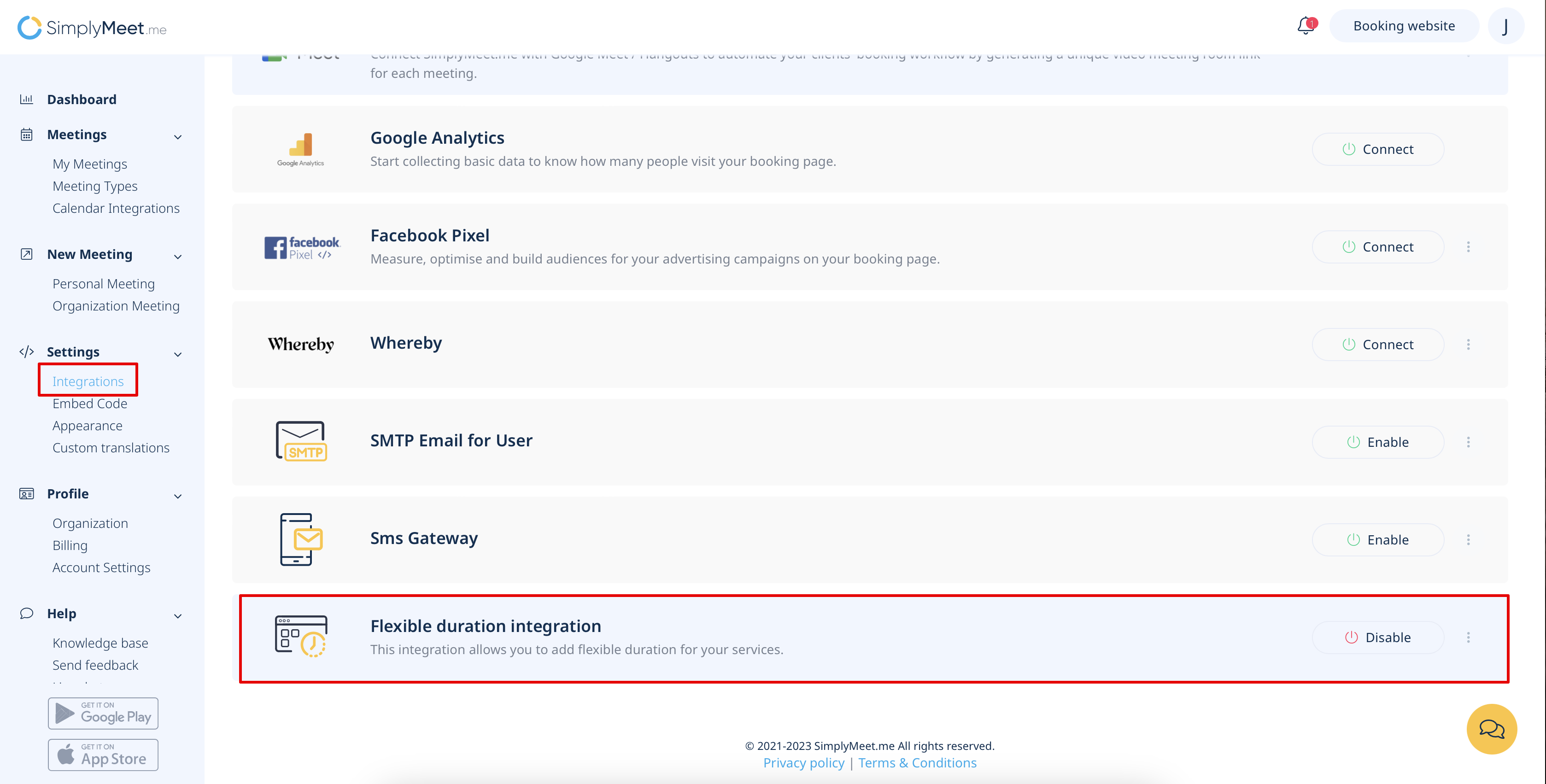
- 1. Enable Flexible duration on the Integrations & Plugins page.
- 2. Navigate to your Meeting types page and create new meeting type or edit the existing one.

- 3. In Meeting duration switch to Flexible duration and add all the duration options that you would like to be available to choose from the client side.
- Save settings.

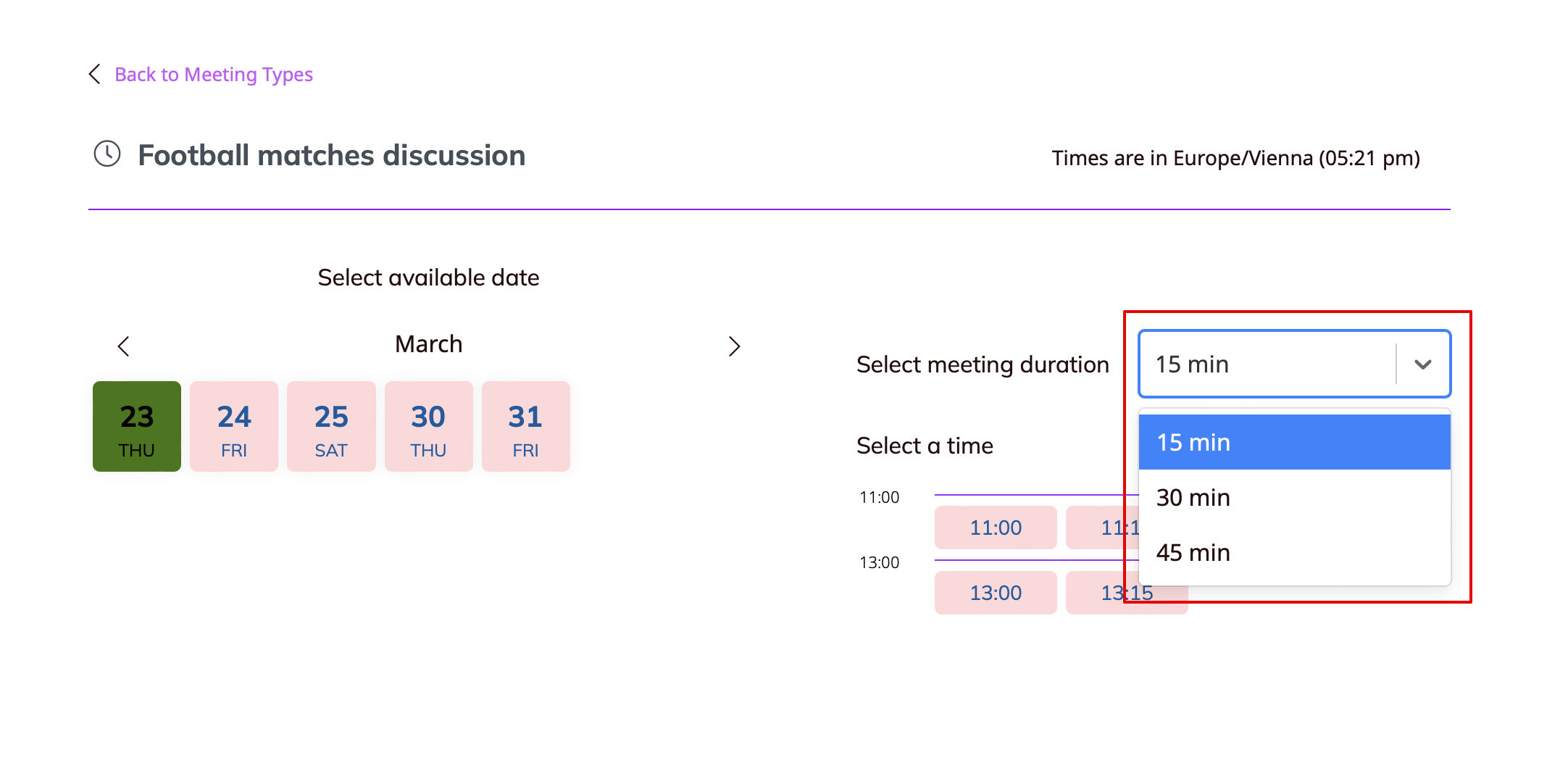
- 4. As the result there will be a drop-down menu on the time step where the customers will be able to choose the desired duration and book the corresponding meeting.