Created page with "<p> Allows your clients to book multiple meetings at the same time throughout different dates before they check-out and pay for all meetings with one payment. This can be en..." |
No edit summary |
||
| (5 intermediate revisions by the same user not shown) | |||
| Line 3: | Line 3: | ||
This can be enabled for specific meeting types. | This can be enabled for specific meeting types. | ||
</p> | |||
'''Note:''' This is a Paid plan feature. | |||
<p> | <p> | ||
1. Enable '''Multiple meetings''' from the '''[https://secure.simplymeet.me/integrations Integrations]''' | 1. Enable '''Multiple meetings''' from the '''[https://secure.simplymeet.me/integrations Integrations & Plugins]''' -> User Integrations. | ||
[[File:Multiple Meetings.png|1200px|center|link=https://help.simplymeet.me/index.php?title=File:Multiple_Meetings.png]] | |||
</p> | </p> | ||
<p> | <p> | ||
2. Go to the '''[https://secure.simplymeet.me/event_types/ Meeting types]''' tab, select a specific meeting type and in Additional Options move the slide next to Allow clients to book multiple meeting slots to activate this feature. Save. | 2. Go to the '''[https://secure.simplymeet.me/event_types/ Meeting types]''' tab, select a specific meeting type and in Additional Options move the slide next to '''Allow clients to book multiple meeting slots''' to activate this feature. Save. | ||
[[File:Multiple Meetings Enable.png|1200px|center|link=https://help.simplymeet.me/index.php?title=File:Multiple_Meetings_Enable.png]] | |||
</p> | </p> | ||
<p> | <p> | ||
| Line 17: | Line 19: | ||
<p> | <p> | ||
Once a client clicks to schedule the selected meetings a separate confirmation notification will be sent for each appointment.<br> | Once a client clicks to schedule the selected meetings a separate confirmation notification will be sent for each appointment.<br> | ||
Client may also add each meeting time to the external calendar. | Client may also add each meeting time to the external calendar.<br> | ||
(Meetings booked as part of a multiple pack will show a corresponding visual badge in meeting details within the SimplyMeet.me Calendar tab) | |||
[[File:Multiple meetings sm client side.png|1200px|center|link=https://help.simplymeet.me/images/1/1c/Multiple_meetings_sm_client_side.png]] | |||
</p> | </p> | ||
Latest revision as of 17:54, 14 August 2026
Allows your clients to book multiple meetings at the same time throughout different dates before they check-out and pay for all meetings with one payment. This can be enabled for specific meeting types.
Note: This is a Paid plan feature.
1. Enable Multiple meetings from the Integrations & Plugins -> User Integrations.

2. Go to the Meeting types tab, select a specific meeting type and in Additional Options move the slide next to Allow clients to book multiple meeting slots to activate this feature. Save.

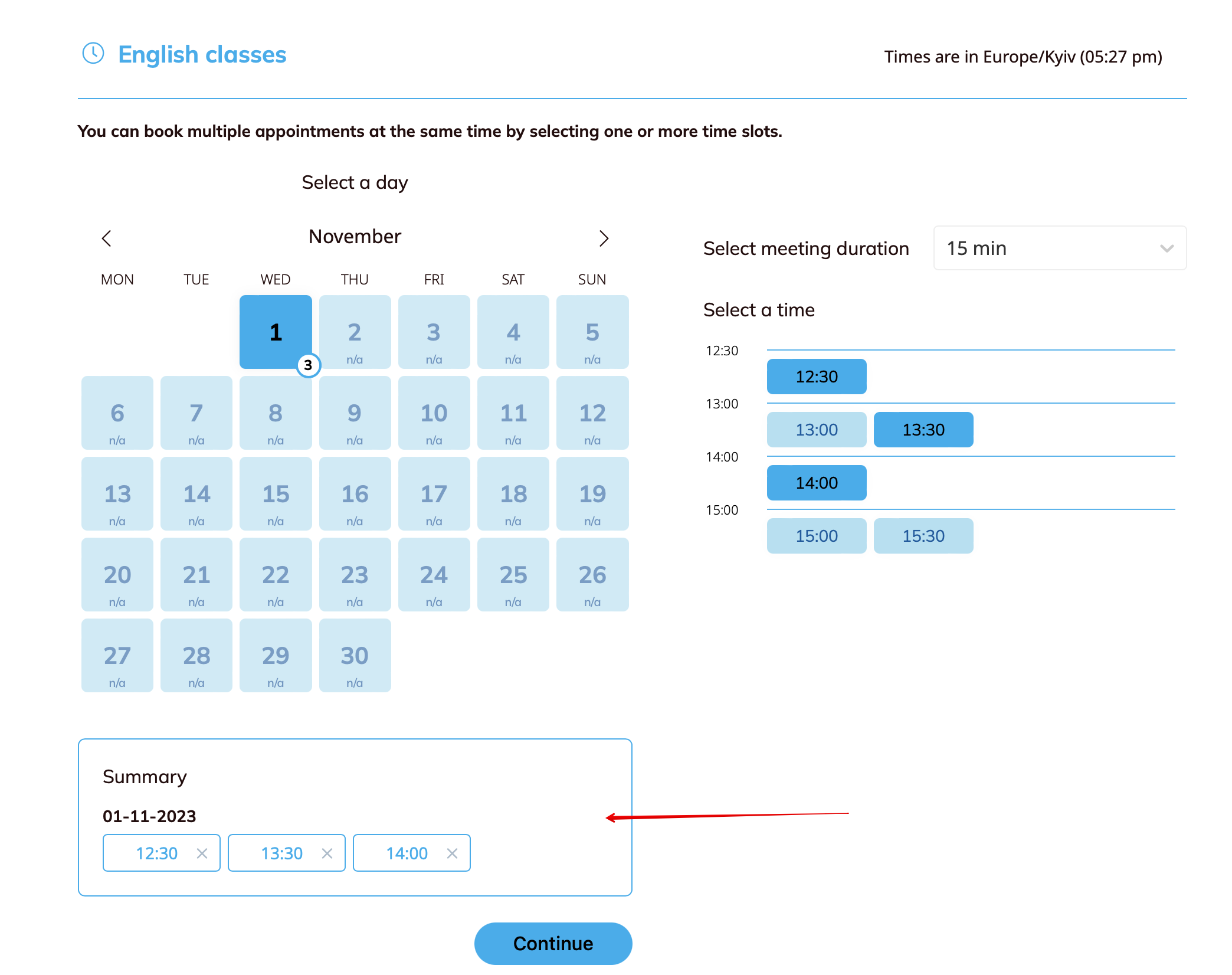
This feature adds the "Summary" to the booking page from where clients can manage selected dates and times.
Once a client clicks to schedule the selected meetings a separate confirmation notification will be sent for each appointment.
Client may also add each meeting time to the external calendar.
(Meetings booked as part of a multiple pack will show a corresponding visual badge in meeting details within the SimplyMeet.me Calendar tab)